

How It All Fits Together
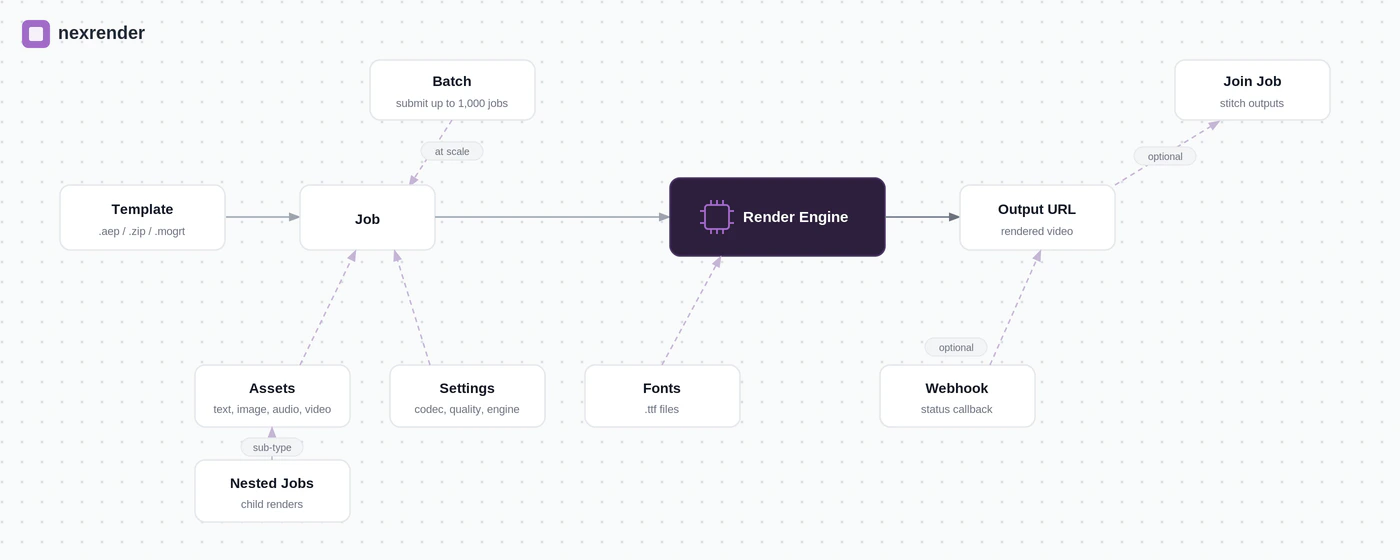
Concepts
Template
A template is an After Effects project file uploaded to Nexrender Cloud. It’s the reusable foundation for all render jobs. Once uploaded, Nexrender introspects the file and extracts its available compositions and editable layers, which you can then target in job payloads. Supported formats:| Format | Description |
|---|---|
.aep | Native After Effects project file |
.zip | AEP bundled with its assets - recommended for complex projects |
.mogrt | Motion Graphics Template exported from AE |
Job
A job is a single render instruction. It references a template and composition, defines which assets to inject dynamically, and optionally specifies output settings, a webhook callback, and an upload destination. Jobs are stateless and idempotent - the same payload will always produce the same output, as long as the template hasn’t changed. A job moves through the following statuses:| Status | Meaning |
|---|---|
queued | Waiting to be picked up by a render worker |
pending | Parent job waiting for child jobs to finish (nested jobs only) |
render:dorender | Actively rendering |
finished | Render complete - outputUrl is available |
error | Render failed - see the error field for details |
manually_cancelled | Job was cancelled via the API |
Assets
Assets are the dynamic inputs injected into a job at render time. Each asset targets a named layer in the composition and replaces or overrides its content.| Type | What it does |
|---|---|
text | Replaces text content in a layer |
data | Overrides any layer property by name (e.g. Source Text, Opacity) |
image | Replaces an image layer with a URL-sourced file |
video | Replaces a footage layer with a video from a URL |
audio | Injects an audio file into a layer |
static | Places a file (JSON, CSV, etc.) in the working directory for the render to use |
essential | Sets fields in a Motion Graphics Template via Essential Properties |
script | Runs a custom script during the render pipeline for advanced manipulation |
function | Runs a built-in Nexrender function (e.g. nx:text-params-set, nx:layer-remove) |
job | Renders a child job first and injects its output as a layer in the parent (see Nested Jobs) |
Batch
A batch is a way to submit up to 1,000 jobs in a single API request. Each job in the batch follows the same schema as a regular job. The API returns abatchId you can use to track the group’s overall progress.
Batches support partial success - if some jobs fail validation, the rest still proceed. The response tells you exactly which jobs succeeded and which failed, along with error details per job.
Use a batch when:
- Rendering a large set of personalised videos (e.g. event invites, product variants)
- You need to submit high volumes quickly and track them as a unit
- You want to cancel the entire group in one call if needed
Nested Jobs
A nested job is a child render whose output is automatically injected as a video or image layer into a parent job. You define it inline as an asset oftype: "job" inside the parent’s asset list.
When Nexrender sees a nested job asset, it:
- Creates and renders the child job first
- Waits for the child to finish (
pendingstate on the parent) - Injects the child’s
outputUrlinto the specified layer of the parent - Renders the parent
Join Job
A join job stitches multiple video clips into a single output. It is submitted to a dedicated endpoint (POST /jobs/join) and takes an ordered list of assets - either static video URLs or nested job definitions that render first.
Use a join job when:
- You want to concatenate intro, main content, and outro segments
- Each segment is rendered separately and needs to be assembled in sequence
- You want the full pipeline - render + stitch - handled in one API call
Webhook
A webhook is an HTTP callback you configure on a job to receive a notification when rendering completes or fails. Rather than pollingGET /jobs/:id repeatedly, Nexrender will POST the job result to your endpoint.
Nexrender retries failed webhook deliveries up to 3 times with exponential backoff.
Fonts
Fonts are.ttf files you upload once to your Nexrender team account. Once uploaded, you reference them by filename in the fonts array of any job payload. Nexrender installs them on the render worker before After Effects starts, ensuring your typography renders correctly.
If a job references a font that hasn’t been uploaded, Nexrender will flag it in the missingFonts field of the job creation response.
Secrets
Secrets are encrypted key-value pairs stored at the team level. You reference them in job payloads using${secret.NAME} syntax - for example in upload.params to avoid embedding S3 credentials directly in requests. Secret values are never returned in API responses once stored.
Which Mode Should I Use?
| Scenario | Recommended approach |
|---|---|
| Render a single video | Single job (POST /jobs) |
| Render hundreds of variants at once | Batch (POST /batches) |
| One composition depends on another’s output | Nested job (type: "job" asset) |
| Concatenate multiple clips into one video | Join job (POST /jobs/join) |
| Combine all of the above | Batch of jobs with nested assets and a join step |
Next Steps
Template Setup
Upload your first After Effects template via the API
Rendering Basics
Learn about asset types, settings, and job payload structure
Batch Jobs
Submit up to 1,000 jobs in a single request
Nested Jobs
Render child compositions and inject their output into a parent job